Choosing the right gaming monitor can make a significant difference to your entire gaming experience. A powerful graphics card is important, but the display determines how smoothly games move, how accurately colors are reproduced, and how much detail you can see. MSI offers a broad selection of gaming monitors, including high-refresh-rate IPS displays, curved ultrawide screens, and premium QD-OLED models.
However, the best MSI gaming monitor is not necessarily the most expensive one. Competitive players may prioritize refresh rate and motion clarity, while gamers who enjoy cinematic single-player titles may prefer 4K resolution, deep contrast, and vibrant colors. People who use one screen for gaming and productivity may also benefit from a larger display, USB-C connectivity, or an ultrawide format.
In this guide, we explore the most important features to consider when buying an MSI gaming monitor. We also look at three specific MSI models representing different display categories, explain the differences between OLED, QD-OLED, IPS, and VA technologies, and help you choose a screen that fits your gaming setup and budget.
Quick Guide: Which MSI Gaming Monitor Should You Choose?
Before looking at individual models, consider what matters most to you. Different monitor technologies and specifications are designed for different gaming needs.
- Best for premium 4K gaming: MSI MPG 321URX QD-OLED, with a 31.5-inch 4K display and 240Hz refresh rate.
- Best for immersive ultrawide gaming: MSI MAG 341CQP QD-OLED X28, with a 34-inch curved ultrawide display and 280Hz refresh rate.
- Best for a compact premium 4K setup: MSI MAG 272UP QD-OLED X24, combining a 26.5-inch 4K panel with a 240Hz refresh rate.
- Best for competitive gaming: Look for an MSI monitor with a high refresh rate, low response time, and a resolution your graphics card can handle.
- Best for everyday gaming: A well-balanced QHD IPS or VA monitor may offer better value than an expensive OLED display.
These recommendations are based on product specifications and intended use, not a universal performance ranking. Availability and regional configurations can vary.
Three MSI Gaming Monitors Worth Considering
MSI offers several gaming monitor families, and the right model depends on your preferred screen size, resolution, refresh rate, and panel technology. The following three products illustrate different approaches to premium gaming displays.

MSI MPG 321URX QD-OLED
Best for premium 4K gaming
This 31.5-inch QD-OLED monitor combines 4K UHD resolution, a 240Hz refresh rate, and a 0.03ms GtG response time. It is designed for gamers who want detailed images, deep contrast, and smooth motion in one premium display.
Explore MSI MPG 321URX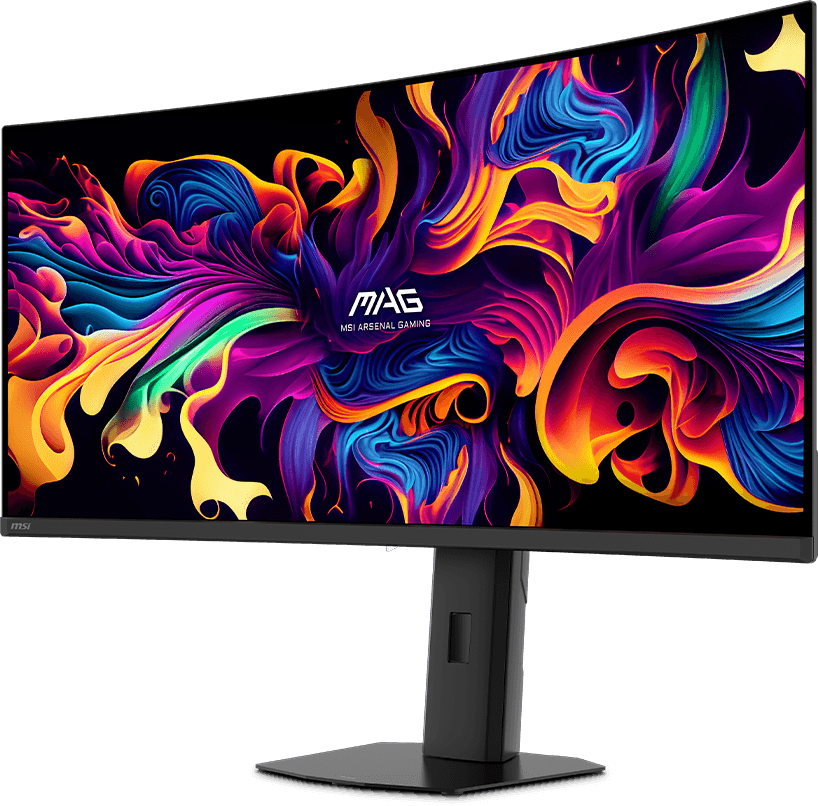
MSI MAG 341CQP QD-OLED X28
Best for immersive ultrawide gaming
This 34-inch curved QD-OLED display offers UWQHD resolution of 3440 x 1440 and a 280Hz refresh rate. Its ultrawide format provides a wider field of view in supported games and additional screen space for multitasking.
Explore MSI MAG 341CQP
MSI MAG 272UP QD-OLED X24
Best for compact premium 4K gaming
This 26.5-inch QD-OLED monitor combines 3840 x 2160 resolution with a 240Hz refresh rate and a 0.03ms GtG response time. It is an interesting option for gamers who prefer a smaller screen while retaining high pixel density and premium display technology.
Explore MSI MAG 272UPAlways check the current regional product page before purchasing. Product availability, specifications, included accessories, and warranty conditions can differ between markets.
1. Why Choose an MSI Gaming Monitor?
MSI has developed a broad monitor portfolio covering competitive gaming, immersive entertainment, and everyday productivity. Its gaming monitors are available in several product families, including MAG, MPG, and selected MEG models.
The main advantage of this variety is that buyers can choose a display based on their priorities rather than being restricted to one type of screen. Some users want a fast Full HD monitor for esports, while others prefer a 4K OLED display for cinematic games and visually demanding titles.
A Broad Range of Display Technologies
MSI offers monitors using several panel technologies, including IPS, VA, OLED, and QD-OLED. Each technology has different strengths.
IPS displays are often attractive for their viewing angles, color reproduction, and availability across different price ranges. VA panels can offer strong native contrast, particularly in darker environments. OLED and QD-OLED displays provide pixel-level light control, deep blacks, and extremely fast pixel response.
Choosing the right technology depends on the games you play, the lighting in your room, and how you use your computer outside gaming.
High Refresh Rates
High-refresh-rate monitors are particularly useful for competitive gaming. MSI offers displays with a wide range of refresh rates, including 144Hz, 165Hz, 240Hz, 280Hz, 300Hz, 360Hz, and higher values on selected models.
A higher refresh rate allows the screen to display more frames per second when the computer can produce them. This can make motion appear smoother and improve the feeling of responsiveness.
Gaming-Oriented Features
Depending on the model, MSI gaming monitors may include adaptive synchronization, gaming modes, crosshair assistance, screen controls, USB hubs, KVM functionality, and OLED protection features.
These extras are not equally important to every buyer. Competitive gamers may appreciate motion-related features, while users who connect multiple computers may find USB-C and KVM functionality more useful.
2. Understanding MSI Gaming Monitor Series
MSI organizes its monitor portfolio into several product families. Understanding the differences can help you narrow down the available options.
MSI MAG Series
The MAG family covers a broad range of gaming monitors. Depending on the model, it includes IPS, VA, and OLED displays, with different screen sizes, resolutions, and refresh rates.
MAG monitors can appeal to buyers looking for a practical gaming display as well as users interested in premium QD-OLED technology. The exact feature set depends on the model number.
When comparing MAG monitors, check the full model designation. Two products with similar names may have different panel technologies, resolutions, or refresh rates.
MSI MPG Series
The MPG family includes gaming monitors with an emphasis on advanced features and enthusiast-oriented specifications. It includes premium QD-OLED models, high-resolution displays, and products with gaming-oriented connectivity and software features.
MPG is worth exploring if you are building a high-performance gaming setup and want a display that can take advantage of a powerful graphics card.
MSI MEG Series
The MEG family represents MSI’s enthusiast-oriented product category. Availability and product selection depend on the current generation and market.
Buyers interested in premium or specialized displays should compare the specifications of available MEG products with suitable MPG alternatives rather than assuming that a higher product-family designation automatically means better value.
3. OLED vs QD-OLED vs IPS vs VA: Which Panel Technology Is Best?
Panel technology is one of the most important decisions when buying a gaming monitor. It affects contrast, color reproduction, motion response, viewing angles, and the overall appearance of games.
OLED Monitors
OLED technology uses self-emissive pixels. Each pixel produces its own light, which means individual pixels can switch off completely to display black.
This allows OLED displays to deliver extremely deep blacks and very high contrast. Dark scenes can look more realistic, and bright objects can stand out against dark backgrounds.
OLED pixels also respond very quickly to changes in image content. This makes OLED technology attractive for fast games where motion clarity matters.
However, OLED monitors have considerations that buyers should understand. Static elements displayed for long periods can contribute to image retention or burn-in over time. Modern OLED monitors include protection features, but these do not eliminate every possible risk.
OLED displays may also behave differently in bright rooms depending on panel technology, screen coating, and ambient lighting.
QD-OLED Monitors
QD-OLED combines OLED technology with quantum-dot color conversion. The goal is to combine OLED’s pixel-level light control with strong color reproduction.
For gaming, QD-OLED can provide vivid colors, deep blacks, high contrast, and very fast response characteristics. These qualities make it attractive for visually rich games, competitive titles, and entertainment.
MSI offers several QD-OLED gaming monitors across its MAG and MPG families. Some models combine this panel technology with 4K resolution and high refresh rates, while others use ultrawide formats.
Before choosing a QD-OLED monitor, consider the amount of static content displayed on your screen, your room lighting, and the availability of panel protection features.
IPS Monitors
IPS technology is widely used in gaming monitors because it can provide good viewing angles and color performance. Modern gaming-oriented IPS panels can also offer high refresh rates and fast response characteristics.
IPS is often a practical choice for people who want a versatile display for gaming, productivity, browsing, and general computer use.
Compared with OLED, IPS displays generally cannot provide the same pixel-level black control. Dark scenes may therefore look less impressive in a dark room, depending on the panel and backlight implementation.
On the other hand, IPS can be a sensible choice for users who want to avoid some of the specific considerations associated with OLED technology.
VA Monitors
VA panels are known for their relatively strong native contrast compared with many conventional IPS panels. This can make them attractive for games with dark environments and for watching movies.
VA technology is also common in curved gaming monitors. The curved format can create a more immersive experience, especially on larger displays.
However, VA panels vary considerably in response behavior. Some models can show noticeable dark-level smearing in fast-moving scenes. Check independent reviews of the exact model if motion clarity is important to you.
Which Panel Should You Choose?
- Choose QD-OLED if you want deep blacks, vibrant colors, high contrast, and very fast response.
- Choose IPS if you want a versatile gaming and productivity monitor with broad viewing angles.
- Choose VA if you prefer strong contrast and are interested in curved or larger-format displays.
- Consider conventional OLED if the specific monitor offers the image quality, refresh rate, and protection features you need.
There is no single best panel technology for everyone. Your gaming habits, environment, and budget should determine the choice.
4. Resolution: Full HD, QHD, or 4K?
Resolution determines how many pixels are used to create the image. Higher resolutions can display more detail, but they also require more graphics processing power.
Full HD: 1920 x 1080
Full HD remains a practical resolution for budget gaming and competitive titles. It is less demanding on the graphics card than QHD or 4K, which can help users achieve higher frame rates.
A Full HD monitor can be a sensible option for esports players who prioritize performance over maximum image detail.
QHD: 2560 x 1440
QHD is often considered a strong balance between sharpness and gaming performance. It offers noticeably more pixels than Full HD without requiring as much GPU power as 4K.
For many PC gamers, a 27-inch QHD display is a practical combination of screen size, clarity, and performance.
4K UHD: 3840 x 2160
4K provides four times the total pixel count of Full HD. It can deliver highly detailed images and is particularly attractive for large displays and visually rich games.
However, gaming at 4K can place substantial demands on the graphics card. If you want to take full advantage of a 4K 240Hz monitor, you need hardware capable of delivering very high frame rates in your preferred games.
Upscaling technologies can help improve performance, but the results depend on the graphics card, game, and selected settings.
Ultrawide UWQHD: 3440 x 1440
Ultrawide monitors use a wider aspect ratio than conventional 16:9 screens. A 3440 x 1440 display offers additional horizontal space that can improve immersion in supported games.
Ultrawide monitors are also useful for multitasking, allowing users to place several application windows side by side.
Not every game supports ultrawide resolutions equally well. Some titles may use a standard field of view, display black bars, or require adjustments. Check compatibility with the games you play most often.
5. Refresh Rate: Is 144Hz, 240Hz, or 360Hz Worth It?
Refresh rate is measured in hertz (Hz) and indicates how many times per second the monitor can refresh its image.
A 60Hz monitor refreshes the image up to 60 times per second, while a 144Hz display can refresh it up to 144 times per second. Higher refresh rates can make movement appear smoother when the computer delivers enough frames.
144Hz and 165Hz
These refresh rates are suitable for many gamers and represent a substantial improvement over conventional 60Hz displays.
They can be a good choice for mainstream gaming, particularly when paired with a QHD resolution. Players who do not compete at a high level may find this range more than sufficient.
240Hz
240Hz is attractive for competitive gamers and enthusiasts who want very smooth motion. It can also be useful in fast-paced games where high frame rates are achievable.
However, the benefits depend on the computer. A monitor cannot display 240 unique frames per second if the graphics card and processor cannot generate them.
280Hz and 300Hz
These refresh rates provide another step toward very high-speed gaming displays. They are most relevant to players who use powerful gaming systems and play titles capable of producing high frame rates.
For casual gaming, the difference compared with 240Hz may be less important than display quality, resolution, or price.
360Hz and Higher
Extremely high refresh rates are aimed primarily at competitive gaming. They can reduce the time between displayed frames, but the practical benefit depends on the game, system performance, and individual player.
Do not spend extra money on a very high refresh rate if your computer cannot consistently deliver the required frame rates or if you mostly play slower-paced games.
6. Response Time, Motion Clarity, and Adaptive Sync
Refresh rate is only one part of motion performance. Response time and adaptive synchronization also affect the gaming experience.
What Does Response Time Mean?
Response time describes how quickly a pixel changes from one state to another. Manufacturers often advertise gray-to-gray (GtG) response times.
Very low response times can help reduce visible trailing and ghosting, but the advertised number should not be treated as a complete measure of motion quality.
Different response-time measurement methods can produce different results. Independent testing is useful for understanding real-world behavior, including overshoot and motion clarity.
Adaptive Sync
Adaptive synchronization allows the monitor’s refresh rate to adjust dynamically to the frame rate produced by the graphics card within a supported range.
This can reduce screen tearing and improve smoothness when frame rates fluctuate.
MSI gaming monitors may support technologies such as AMD FreeSync or NVIDIA G-SYNC compatibility, depending on the model. Always check the official specifications for the exact monitor and graphics card combination.
Why Frame-Time Consistency Matters
A high average frame rate does not always guarantee a smooth gaming experience. Irregular frame delivery can create visible stuttering even when the average FPS number looks impressive.
A good monitor, suitable adaptive synchronization, and a well-balanced gaming PC can help provide a more consistent experience.
7. Screen Size: 24, 27, 32, or 34 Inches?
Screen size affects immersion, viewing distance, desk space, and perceived image sharpness. The best size depends on the resolution and how far you sit from the display.
24-Inch Monitors
24-inch monitors are popular among competitive gamers who prefer a compact screen. The entire display can be viewed comfortably without moving the eyes or head as much.
Full HD is a common resolution in this category, although specifications vary by model.
27-Inch Monitors
27 inches is a versatile size for gaming and general computer use. It works particularly well with QHD resolution and can also be used with 4K panels.
This size is worth considering if you want one monitor for gaming, browsing, office work, and entertainment.
32-Inch Monitors
32-inch monitors provide a larger viewing area and can create a more immersive gaming experience. A 4K resolution is particularly attractive at this size because it provides high pixel density.
Before choosing a 32-inch monitor, make sure your desk is deep enough to maintain a comfortable viewing distance.
34-Inch Ultrawide Monitors
34-inch ultrawide displays provide a wider field of view and additional workspace. They can be excellent for racing games, simulation titles, role-playing games, and productivity.
However, their wider format requires more desk space and may not be ideal for every competitive game. Check the supported aspect ratios of your favorite titles.
8. Curved vs Flat MSI Gaming Monitors
Curved and flat monitors offer different experiences, and neither is automatically better.
Advantages of Curved Monitors
A curved display can make a large or ultrawide screen feel more immersive by bringing the edges closer to the viewer.
This can be particularly attractive for racing games, flight simulators, and titles that benefit from a wider field of view.
Curved displays can also create a comfortable viewing experience on some large screens, although personal preference plays an important role.
Advantages of Flat Monitors
Flat displays are familiar, versatile, and often easier to use for productivity tasks involving straight lines, documents, and graphic design.
They can also be more practical for multi-monitor setups because aligning several flat displays is straightforward.
What Does Curvature Mean?
Curvature is commonly expressed using a number such as 1800R or 1500R. A lower number represents a tighter curve.
Curvature should be considered alongside screen size and viewing distance. A curve that feels comfortable on a large ultrawide display may feel unnecessary on a smaller monitor.
9. HDR and Color Quality
HDR stands for High Dynamic Range. It is designed to provide a wider range of brightness and improve the appearance of bright highlights and dark details.
However, not every monitor marketed as HDR delivers the same experience. Panel technology, peak brightness, contrast, local dimming, and certification all matter.
VESA DisplayHDR Certification
VESA DisplayHDR certifications provide a framework for evaluating display performance. OLED products may carry DisplayHDR True Black certifications, which focus on the characteristics of displays capable of producing deep blacks.
For example, MSI’s MPG 321URX QD-OLED includes VESA DisplayHDR True Black 400 certification. The MAG 272UP QD-OLED X24 also lists DisplayHDR True Black 400.
Certification is useful, but it should not replace independent reviews and real-world evaluation.
Color Gamut
Color gamut describes the range of colors a display can reproduce. It is commonly expressed using standards such as sRGB, Adobe RGB, and DCI-P3.
For gaming, a wide color gamut can make images appear more vibrant. For photography and video editing, color accuracy and calibration are also important.
A monitor with a wide gamut is not automatically accurate. Look for information about factory calibration, color modes, and measured accuracy if you use the display for professional creative work.
10. OLED Care and Burn-In Considerations
OLED technology offers excellent contrast and response characteristics, but buyers should understand how static content can affect OLED panels over time.
Burn-in is a form of permanent uneven pixel wear that can occur when certain elements remain visible for extended periods. The risk depends on usage patterns, brightness, panel design, and protection systems.
MSI OLED Care Features
Selected MSI OLED monitors include OLED Care features designed to help reduce the risk of image retention and uneven panel wear.
Depending on the model, these may include pixel shifting, panel refresh procedures, static image detection, and other protective functions.
These technologies are useful, but they should not be interpreted as a guarantee that burn-in is impossible.
Good OLED Usage Habits
- Keep the monitor’s OLED protection features enabled.
- Allow automatic panel maintenance to run when requested.
- Avoid leaving static images displayed for unnecessarily long periods.
- Use reasonable brightness settings for everyday desktop work.
- Enable screen sleep or automatic display-off settings.
- Follow the manufacturer’s maintenance recommendations.
For people who spend many hours working with static interfaces, spreadsheets, or dashboards, an IPS monitor may be a more comfortable choice. For gaming and multimedia, OLED can be extremely appealing.
11. Connectivity: HDMI, DisplayPort, USB-C, and KVM
Connectivity is easy to overlook when comparing gaming monitors, but it can affect compatibility with computers, consoles, and other devices.
HDMI
HDMI is widely used by gaming PCs, consoles, laptops, and other entertainment devices. HDMI 2.1 can support high-bandwidth video modes, including 4K at high refresh rates, when the monitor and connected device support the required specifications.
Check the exact HDMI version and supported resolution and refresh-rate combinations before buying.
DisplayPort
DisplayPort is commonly used for PC gaming monitors. It can provide high-bandwidth video transmission and support high-resolution, high-refresh-rate configurations.
The actual capabilities depend on the DisplayPort version, monitor implementation, graphics card, and cable.
USB-C
USB-C can simplify connections for compatible laptops. Depending on the monitor, USB-C may carry DisplayPort video, data, and power delivery through one cable.
Power delivery is particularly useful for people who connect a laptop to an external display. Check the wattage available from the monitor and whether it is sufficient for your laptop.
KVM Functionality
A KVM switch allows users to control multiple connected computers with one keyboard and mouse. This can be useful if you use a desktop PC and work laptop at the same desk.
Not every MSI gaming monitor includes KVM functionality. Check the exact product specifications if this feature is important to you.
12. Gaming Monitors for Different Types of Players
The right monitor depends on the games you play and the experience you want.
Competitive FPS Players
Players who spend most of their time in competitive shooters should prioritize refresh rate, response behavior, input latency, and motion clarity.
A 240Hz or higher display can be attractive if the gaming PC can produce sufficiently high frame rates. A smaller screen may also be easier to view during fast competitive matches.
Resolution is important, but some competitive players prefer Full HD or QHD because these resolutions are less demanding than 4K.
Racing and Simulation Gamers
Racing and simulation games can benefit from large and ultrawide displays. A wider aspect ratio may improve immersion and provide additional peripheral information in supported titles.
A curved 34-inch ultrawide monitor can be an attractive option for these gaming styles.
Open-World and Single-Player Gamers
Players who enjoy cinematic games may prioritize resolution, contrast, HDR performance, and color reproduction.
A 4K QD-OLED monitor can provide a visually impressive experience, particularly in games with detailed environments and strong lighting effects.
Console Gamers
Console users should check HDMI compatibility, supported resolutions, refresh rates, VRR, and console-specific features.
For modern consoles, HDMI 2.1 support can be particularly relevant when using compatible 4K and 120Hz output modes.
Streamers and Content Creators
Streamers and creators may benefit from a larger screen, accurate colors, and useful connectivity. A monitor that combines gaming features with good productivity capabilities can simplify a multi-purpose setup.
Consider whether you need USB-C, KVM, a USB hub, height adjustment, or a color-accurate display mode.
13. How Much Should You Spend on an MSI Gaming Monitor?
Gaming monitor prices vary according to panel technology, resolution, refresh rate, screen size, and additional features.
Instead of choosing a monitor based on price alone, consider how much of your budget should go toward the display compared with the graphics card and processor.
Budget Gaming Monitors
Budget buyers should focus on a suitable resolution, a refresh rate that improves on basic displays, and acceptable image quality.
A good IPS or VA monitor may provide excellent value without the additional cost of OLED technology.
Midrange Gaming Monitors
Midrange buyers can often find QHD displays with high refresh rates and useful gaming features.
This category can be particularly attractive for users who want a strong balance between image quality and performance.
Premium Gaming Monitors
Premium displays may offer 4K resolution, QD-OLED technology, very high refresh rates, HDR certifications, USB-C connectivity, and advanced gaming features.
These monitors make the most sense when paired with suitable hardware and when the buyer values the additional image quality.
Do Not Forget the Total Cost
Remember to consider the cost of a monitor arm, suitable cables, desk space, and potential graphics card upgrades.
A 4K 240Hz display may require a powerful PC to deliver the experience you expect. A less expensive QHD monitor could provide better overall value if your graphics card is more suited to that resolution.
14. How to Choose the Right MSI Gaming Monitor
Use the following checklist to narrow down your options before purchasing.
Step 1: Decide on Your Budget
Set a realistic spending limit and decide whether premium features such as QD-OLED, 4K, or USB-C are worth paying extra for.
Step 2: Choose the Resolution
Choose Full HD for more accessible gaming performance, QHD for a balanced setup, or 4K for maximum image detail when your graphics hardware can support it.
Step 3: Select the Screen Size
Consider 24 inches for compact competitive gaming, 27 inches for versatility, 32 inches for a large 4K display, or 34 inches for ultrawide immersion.
Step 4: Compare Refresh Rates
Choose a refresh rate that matches your games and PC performance. A very high refresh rate is less useful if your system cannot produce enough frames.
Step 5: Choose the Panel Technology
Compare IPS, VA, OLED, and QD-OLED based on contrast, color, response characteristics, room lighting, and intended use.
Step 6: Check Connectivity
Make sure the monitor has the connections you need for your PC, laptop, or console. Pay particular attention to HDMI, DisplayPort, USB-C, and power delivery.
Step 7: Review Ergonomics
Check whether the stand supports height adjustment, tilt, swivel, and pivot. If not, consider whether a compatible VESA monitor arm would be useful.
Step 8: Read Independent Reviews
Look for measurements of response time, input lag, brightness, contrast, color accuracy, and motion performance. Manufacturer specifications are useful, but independent testing provides a more complete picture.
15. Common Mistakes When Buying a Gaming Monitor
Buying the Highest Refresh Rate Available
More hertz is not always better value. A 360Hz monitor may be unnecessary for someone who mostly plays single-player games. A higher-quality 165Hz or 240Hz monitor could be a better purchase.
Ignoring Graphics Card Performance
Choosing a 4K high-refresh-rate monitor without considering the graphics card can lead to disappointment. The PC must be capable of delivering the frame rates needed to take advantage of the display.
Assuming Every OLED Monitor Is the Same
OLED monitors can differ in panel generation, brightness, screen coating, protection features, refresh rate, and connectivity. Compare the complete specifications rather than relying on the OLED label.
Ignoring Desk Space
Large and ultrawide monitors need sufficient desk depth and width. Measure your setup before buying, especially if you plan to use monitor speakers, a webcam, or multiple displays.
Choosing Based Only on Advertised Response Time
Response-time claims do not tell the whole story. Independent measurements of pixel transitions, overshoot, and motion clarity can provide a better indication of gaming performance.
Overlooking Connectivity
Check the ports before buying. A monitor may have excellent image quality but lack a connection or feature that matters to your particular setup.
16. MSI Gaming Monitor vs a Gaming TV: Which Should You Choose?
Gaming monitors and gaming televisions serve overlapping purposes, but they are designed around different priorities.
A gaming monitor is usually intended for desktop use, with viewing distances and screen sizes suited to a desk. Monitors may offer high refresh rates, fast response characteristics, ergonomic stands, and desktop-friendly connectivity.
A gaming TV typically offers a much larger screen and is designed for viewing from a greater distance. Modern gaming televisions can also support high refresh rates, variable refresh rate technology, and low-latency gaming modes.
Choose an MSI Gaming Monitor If:
- You play games at a desk.
- You prefer a smaller screen and closer viewing distance.
- You want a dedicated PC gaming display.
- You need ergonomic adjustments and desktop connectivity.
- You prioritize competitive gaming and high refresh rates.
Consider a Gaming TV If:
- You play from a sofa or entertainment area.
- You prefer a much larger screen.
- You primarily use a console.
- You want a display for both gaming and general home entertainment.
The best option depends on your room, seating distance, gaming platform, and personal preferences.
17. Final Verdict: Are MSI Gaming Monitors Worth Buying?
MSI offers a broad selection of gaming monitors, from practical IPS and VA displays to premium QD-OLED models with high resolutions and refresh rates.
The MPG 321URX QD-OLED is an interesting choice for gamers who want 31.5-inch 4K resolution, 240Hz refresh rate, and premium QD-OLED image quality. The MAG 341CQP QD-OLED X28 is aimed at users who prefer an immersive 34-inch ultrawide format with a 280Hz refresh rate. The MAG 272UP QD-OLED X24 provides a smaller 26.5-inch 4K alternative with a 240Hz refresh rate.
However, these premium displays are not automatically the right choice for everyone. A more affordable QHD IPS monitor may provide better value for a mainstream gaming PC, while competitive players may prefer a display with a high refresh rate and a resolution that allows consistently high frame rates.
The most important thing is to match the monitor to your graphics card, games, desk space, and budget. Compare the exact specifications, check independent reviews, and consider how you will use the display outside gaming.
With the right choice, an MSI gaming monitor can become a central part of a setup used for gaming, entertainment, and everyday productivity.
Frequently Asked Questions
Are MSI gaming monitors good?
MSI offers gaming monitors across a wide range of categories, including IPS, VA, OLED, and QD-OLED displays. The best model depends on your budget, graphics card, preferred resolution, and gaming style.
Which MSI gaming monitor is best for 4K gaming?
The MSI MPG 321URX QD-OLED is one premium option, featuring a 31.5-inch 4K UHD QD-OLED panel and a 240Hz refresh rate. The MAG 272UP QD-OLED X24 is another 4K alternative with a smaller 26.5-inch display.
Is a 240Hz MSI gaming monitor worth it?
A 240Hz monitor can be worthwhile for competitive gaming and fast-paced titles when your PC can deliver sufficiently high frame rates. For slower games and everyday use, a lower refresh rate may provide better value.
Is QD-OLED better than IPS for gaming?
QD-OLED offers pixel-level light control, deep blacks, high contrast, and very fast response characteristics. IPS monitors can offer good color performance, viewing angles, and practical value. The better choice depends on your priorities and budget.
Are MSI OLED monitors suitable for everyday work?
Yes, selected OLED monitors can be used for work and productivity. However, users who display static content for long periods should understand OLED image-retention considerations and keep the monitor’s protection features enabled.
What size MSI gaming monitor should I buy?
27 inches is a versatile choice for many desktop gaming setups. A 24-inch display can suit competitive players, while 32-inch and 34-inch monitors provide larger viewing areas and more immersion.
Is QHD better than 4K for gaming?
QHD requires less graphics processing power and can provide an excellent balance of image quality and frame rates. 4K offers more detail but requires a stronger graphics card to maintain high frame rates in demanding games.
Do MSI gaming monitors support NVIDIA G-SYNC?
Some MSI monitors support NVIDIA G-SYNC compatibility or related adaptive synchronization features. Support varies by model, so check the official specifications and compatibility information before buying.
Can I use an MSI gaming monitor with PlayStation or Xbox?
Many MSI gaming monitors can be connected to modern consoles through HDMI. Check the exact monitor’s HDMI capabilities, supported resolution, refresh rates, VRR, and console compatibility.
Are curved MSI monitors better for gaming?
Curved monitors can provide a more immersive experience, particularly with larger ultrawide screens. Flat monitors are often more versatile for general productivity and multi-monitor arrangements. The best option depends on personal preference and desk setup.
How important is response time?
Response time affects how quickly pixels change between colors. Faster pixel transitions can reduce visible trailing, but real-world motion clarity also depends on refresh rate, overshoot, and panel behavior.
Where can I compare MSI gaming monitors?
You can explore MSI’s monitor lineup through our MSI brand guide and compare the specifications of individual products on MSI’s official website.
Explore MSI Gaming Monitors
Ready to upgrade your gaming setup? Explore MSI’s monitor range and compare different screen sizes, resolutions, panel technologies, and refresh rates. Whether you are looking for a fast esports display, a premium QD-OLED screen, or an immersive ultrawide monitor, choosing the right specifications can make a meaningful difference to your experience.
Find the Right MSI Monitor for Your Setup
Explore the MSI brand guide and visit the official monitor catalog to compare available models and specifications.